Test page
Problem:
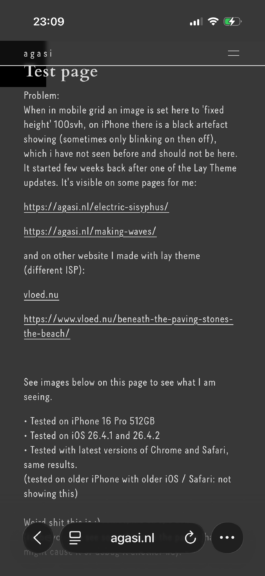
When in mobile grid an image is set to 'fixed height' 100svh and page is published, on (my) iPhone there is a black artefact showing in the top left corner on that page, which should not be visible. It started few weeks back after one of the Lay Theme updates. It's visible on some pages for me:
https://agasi.nl/electric-sisyphus/
https://agasi.nl/making-waves/
And on the other website I made with Lay theme (different ISP):
https://www.vloed.nu/beneath-the-paving-stones-the-beach/
See the images on the bottom of this page to see examples of what I am seeing.
• Tested on iPhone 16 Pro 512GB
• Tested on iOS 26.4.1 and 26.4.2
• Tested with latest versions of Chrome and Safari, same results.
(tested on older iPhone with older iOS / Safari: not showing this)
As recommended in the forum I of course updated Lay theme and all Lay theme addons, disabled all plugins, turned off all custom code. No change, the problem persisted.
Maybe you can see something on the pages that might cause it or debug it another way.
Thanks in advance!
Best, Jos


Test page
Problem:
When in mobile grid an image is set to 'fixed height' 100svh and page is published, on (my) iPhone there is a black artefact showing in the top left corner on that page, which should not be visible. It started few weeks back after one of the Lay Theme updates. It's visible on some pages for me:
https://agasi.nl/electric-sisyphus/
https://agasi.nl/making-waves/
And on the other website I made with Lay theme (different ISP):
https://www.vloed.nu/beneath-the-paving-stones-the-beach/
See the images on the bottom of this page to see examples of what I am seeing.
• Tested on iPhone 16 Pro 512GB
• Tested on iOS 26.4.1 and 26.4.2
• Tested with latest versions of Chrome and Safari, same results.
(tested on older iPhone with older iOS / Safari: not showing this)
As recommended in the forum I of course updated Lay theme and all Lay theme addons, disabled all plugins, turned off all custom code. No change, the problem persisted.
Maybe you can see something on the pages that might cause it or debug it another way.
Thanks in advance!
Best, Jos